How to Generate a CPSC GCC in Minutes: Rules Matching, Lab Picker & Templates Built In
The Friday-afternoon problem
Your container clears next week. The broker wants the ACE eFiling data for the GCC. You have the test report, the importer’s EIN, and a blank Word document where the certificate is supposed to live.
You know the seven fields. You know the rules are somewhere in 16 CFR. You know the lab has to be a real one. But right now it’s all scattered: a rule citation you’re 80% sure about, a lab you’ve never looked up, and a template that’s going to look homemade when the compliance manager opens it.
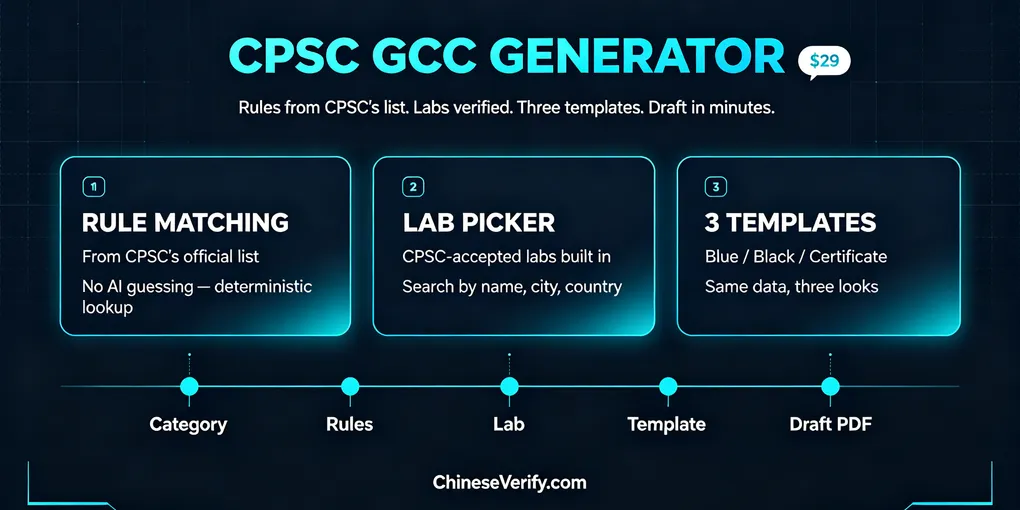
That’s the gap ChineseVerify’s $29 GCC Draft Generator is aimed at. It’s a $29 form that turns those scattered pieces into a draft PDF. Three features do the heavy lifting: rule matching against CPSC’s official list, a built-in lab picker, and three certificate layouts. This article walks through each one and shows what the five-minute version of the workflow actually looks like.
What a GCC is, and why 2026 made it harder
A General Certificate of Conformity is a self-declaration. The U.S. importer of record (or domestic manufacturer) states that a general-use, non-children’s product complies with the CPSC rules that apply to it. The legal basis is section 14(a) of the CPSA, codified at 16 CFR Part 1110. Seven fields: product ID, rule citations, certifier contact, test-record contact, manufacture date and place, test date and place, and the lab (or “N/A”).
It is not issued by a lab. It is signed by the importer. For imports, a foreign factory can’t be the certifier — CPSC’s GCC guidance is specific about this.
What changed in 2026: since July 8, 2026, importers of most CPSC-regulated consumer products have to file certificate data electronically with CBP through ACE (a PGA Message Set) before goods land. The “keep the PDF in the cabinet” routine is gone. Now the seven fields on your certificate have to match the data your broker files and the test report behind them. Three places, one set of facts.
That’s why “a template” isn’t enough anymore. The risk isn’t the formatting. It’s a wrong rule citation, a lab that isn’t what you think it is, and a layout that gets bounced back before anyone reads it.
Feature 1: Rule matching from CPSC’s official list
The field that causes the most grief is field 2: citations to each applicable CPSC rule. Get it wrong and the certificate names a rule that doesn’t apply, or misses one that does.
The tool’s answer comes from a fixed dataset, not from an AI that guesses. You pick a product category (adult apparel, furniture, mattresses, battery-containing electronics, and similar), and it pulls the suggested 16 CFR citations from CPSC’s official “Rules Requiring a GCC” list (August 2024). No AI invents a citation that sounds plausible.
Two details keep it honest.
First, non-mandatory industry references get flagged. Standards like ASTM F381/F2225 for trampolines aren’t backed by a 16 CFR rule, so they’re marked “(industry reference — non-mandatory).” You can list them on the certificate, but they won’t be presented as CPSC requirements.
Second, everything is editable, and the tool says so. Rule mapping is a drafting aid. Final applicable rules depend on product design, materials, intended age and marketing, test records, and the IOR’s responsibility. A mattress pre-fills 16 CFR 1632 and 1633. A textile product points to 16 CFR 1610. You review, you keep or delete, you sign.
Compare that to the alternatives. Flipping through eCFR yourself works, but it eats an afternoon and it’s easy to miss a rule. Asking an AI to draft it is faster and riskier: a hallucinated rule number on a signed certificate is your liability, not the model’s. The tool sits between the two. It doesn’t do the thinking for you, but it makes sure you’re not starting from scratch.
Feature 2: A lab picker that checks CPSC acceptance
Field 7 asks for the lab. If you list one, it has to be real, and it has to match the test report.
The tool embeds a searchable lab directory — ChineseVerify’s CPSC Lab Directory — that mirrors CPSC’s Third-Party Testing GridView. In the test section, the lab name field is a search box: type a name and get active CPSC-accepted labs by name, city, or country. Pick one, or type a name manually if you know exactly what you’re doing.
This matters more than it looks. A lab can be accepted for some scopes and not others, and acceptance status changes over time. The directory shows active records and points you to the official GridView for anything you’re relying on.
One clarification worth repeating, because buyers mix this up: a GCC doesn’t require a CPSC-accepted lab. A general-use product can be tested in-house under a reasonable testing program, and field 7 can say “N/A.” The lab picker is for when you do use a third party — and for anyone who also ships children’s products, where a CPC does require an accepted lab. The tool’s disclaimer is blunt: test information is for recordkeeping consistency only and doesn’t constitute certification, accreditation, or CPSC/CBP approval. However you test, keep the paperwork: CPSC requires supporting test reports and reasonable testing program documentation to be retained for at least five years from the date the GCC is created.
Feature 3: Three templates, one set of data
The certificate has to look like a certificate. Most Word templates give you one look, and when the client or broker wants something different, you reformat.
The generator offers three English PDF layouts at generation time:
| Layout | Look | Best for | Sample |
|---|---|---|---|
| GCC Blue (Archive) | Classic blue dossier, clean corporate header | Internal records, filing | View |
| GCC Black (Archive) | Dark slate / charcoal dossier, muted header | Modern supplier-facing docs | View |
| GCC Certificate (Gulf) | Formal certificate: centered serif title, double-line frame | Attaching to shipments, client-facing | View |
The three samples run the same example data (an adult cotton T-shirt under 16 CFR Part 1610), so the comparison is honest: same fields, different look. The certificate layout is the one that reads like a certificate when a broker or a buyer’s compliance team opens it. The tool notes more templates are on the way; the three current ones are fixed designs, so the required fields stay in place. Custom company branding isn’t a checkbox — that’s a contact-the-team conversation.
The five-step workflow
Here’s how it actually runs.
Step 1 — Pick the category. Adult apparel, furniture, mattress, battery electronics. Suggested rules appear automatically.
Step 2 — Review the rules. Keep, edit, or delete citations. Non-mandatory references are already flagged so they don’t get mistaken for law.
Step 3 — Enter the IOR. This is where people trip. The IOR has to be the U.S. entity registered with CBP at entry, holding an EIN and a customs bond. Not the factory, not the tool. In over 99% of cases the IOR is also the issuer on the GCC; the form only lets you switch that to another U.S. subsidiary or internal division of the same corporate group. Third-party agents can’t be the issuer.
Step 4 — Enter the test reference. Report number, dates, lab. The lab field is a search box into the CPSC-accepted directory. It’s manual entry, because the tool deliberately doesn’t upload or parse test files.
Step 5 — Pick a template and generate. Three layouts, one button. Download the PDF, check all seven fields against your records, and hand the data to your broker for the ACE filing. The IOR’s authorized person signs. Nobody signs for you.
Two things the tool won’t do, and it says so on every page of the form: it doesn’t act as IOR, and it doesn’t file. It turns your data into a structurally correct draft. Issuing and filing stay with the responsible U.S. entity.
Why $29
| Word template | Lab or consultant | ChineseVerify GCC Draft Generator | |
|---|---|---|---|
| Cost | Free | $300+ per product, often more | $29 per draft |
| Rule matching | On you | Yes | Yes (from CPSC’s list, you confirm) |
| Lab verification | On you | Yes | Built-in directory |
| Output formats | One | Varies | Three |
| Legal responsibility | IOR | IOR | IOR |
ChineseVerify sits between the free template and the expensive consultant: you bring the test data, the tool handles the formatting, rule matching, and lab verification. You keep the legal responsibility — and the savings.
The fit is narrow on purpose. You have test data, you need a field-complete English draft, and your product is a straightforward category. That’s the sweet spot: five minutes of form-filling instead of an afternoon of rule-checking and formatting.
It’s the wrong tool for children’s products (that’s a CPC), for buying “compliance” without a test report, and for stacked multi-rule products that need a human compliance judgment. No $29 tool should pretend otherwise.
Bottom line
A GCC is a self-declaration, and the responsibility never leaves the IOR. What a tool can do is make the prep work fast and correct — the rule citation, the lab check, the layout — so you sign something you’re confident in instead of something you hope is right.
Disclosure: this article is for informational purposes only and does not constitute legal or compliance advice. GCC requirements are determined by CPSC regulations; consult a qualified compliance professional for product-specific guidance.
Try it: the GCC Draft Generator. Five minutes of form-filling, ten minutes to a draft. Not sure if your product is GCC or CPC? The full GCC vs CPC review and walkthrough covers the boundary cases.
FAQ
Q: Does the tool pick the regulations for me?
A: No. It pulls suggested citations from a fixed dataset aligned with CPSC’s official “Rules Requiring a GCC” list. You review and confirm the final list. Rule mapping is a drafting aid, not a ruling.
Q: Does a GCC require a CPSC-accepted lab?
A: No. General-use products can be tested in-house under a reasonable testing program, and the lab field can state “N/A.” The built-in lab directory is there to verify any third-party lab you do list.
Q: Can I customize the templates with my company logo?
A: The three current layouts are fixed designs to keep the required fields intact. Custom branding is handled through the team, not in the form.
Q: Can the draft be filed directly with customs?
A: No. The draft is for IOR review and issuance. The certifying U.S. entity signs it, then the data is filed through ACE/PGA by the importer or broker.
Q: What does $29 include?
A: One draft generation — rule matching, lab directory access, and your choice of three templates. It doesn’t include legal advice, testing, or filing.