How to Verify a CPSC-Accepted Lab in 30 Seconds (Before Your GCC Gets Rejected)
The test report is in your hand. Is the lab actually CPSC-accepted?
You have the test report. The lab name looks professional, the letterhead is clean. But there’s a question underneath all of it: does CPSC actually accept this lab — and for the specific test on this product?
Go check the official CPSC Third-Party Testing search. The page loads slowly. The filters are clunky. You’re not sure you’re looking at the right scope. So you close the tab and hope. That’s exactly how a certificate ends up naming a lab that was de-accepted two months ago.
The stakes are concrete. A GCC or CPC that names a lab without the right acceptance is invalid for that product. Under 2026 eFiling, the lab name you file in ACE has to match your certificate and your test report. One character off, or one expired acceptance, and the shipment sits at the port.
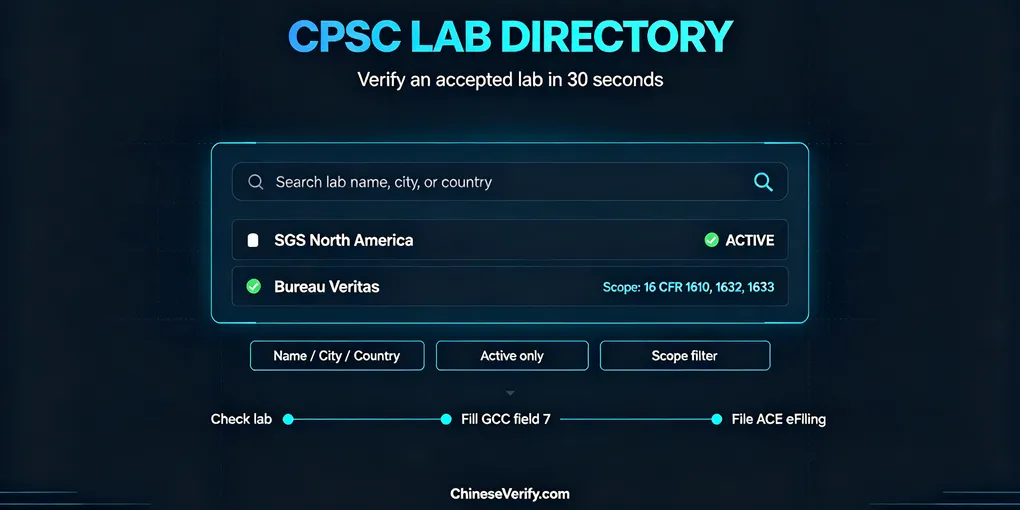
The ChineseVerify CPSC Lab Directory is a read-only mirror of CPSC’s GridView, built for one job: check a lab in about 30 seconds.
Why lab verification matters more in 2026
Two certificates, two different lab rules.
A GCC (general-use, non-children’s products) does not require a CPSC-accepted lab. You can test in-house under a reasonable testing program, and field 7 can say “N/A.” But if you do name a third-party lab, it needs to be real and it needs to cover what it claims.
A CPC (children’s products, age 12 and under) does require a CPSC-accepted third-party lab for the specific children’s product safety rules that apply.
The scope trap is where people get hurt. A lab can be accepted for some tests and not others. Accepted for textile flammability doesn’t mean accepted for toys or lead content. If the test falls outside the accepted scope, the certificate doesn’t hold up.
And since July 8, 2026, importers of most CPSC-regulated products file certificate data electronically through ACE. The lab name, the certificate, and the test report all have to line up. This is not a field you want to guess on.
What’s wrong with the official GridView
CPSC’s own lab search works, and it’s the authoritative source. But as a day-to-day checking tool it has real problems:
- Slow pages and a clunky interface, especially on mobile
- Searching by name works, but finding “is this lab accepted for my standard” means clicking into details
- No quick snapshot — you can’t tell at a glance whether what you’re seeing is current
None of this is a reason to distrust CPSC. It’s a reason to have a faster lookup for the routine check, and to confirm the final call on the official source.
What the ChineseVerify CPSC Lab Directory is
A read-only mirror of the CPSC-accepted laboratory list. It does not rank labs, recommend them, or rate them. It exists to answer one question: is this lab on the accepted list, and for what?
Data is sourced from CPSC’s list (the Third-Party Testing GridView). Only active records are shown. The page says plainly that acceptance status can change, and it points you to CPSC’s official search for anything you’re relying on. It’s a reference tool, not a certification intermediary.
Three things you can do with it
① Search by name, city, or country. Type a lab name and get results fast. Filter by city or country when you need to confirm which address an acceptance is tied to.
② Only active records, shown clearly. Labs that have been de-accepted, suspended, or otherwise removed don’t clutter your results. You don’t have to figure out whether a grayed-out entry is still valid — if it’s not in the list, it’s not current. Status can still change after you look, so the page points you to CPSC for the final check.
③ Filter by scope / standard. Search by a 16 CFR test standard (1610, 1632, 1633, and others) to see which labs are accepted for that specific rule. This is the check that matters most, because it answers the scope trap from earlier: not just “is this lab accepted,” but “is it accepted for my product’s standard.”
The 30-second check
- Open the lab directory.
- Enter the lab name — SGS, Bureau Veritas, TÜV, whatever is on your test report.
- Look at the status and the location tied to the acceptance.
- Match the accepted scope against the standard on your test report.
- If they line up, you can name that lab in GCC field 7 or on the CPC.
It plugs into the GCC generator
The lab directory isn’t just a standalone page. The same lab lookup is embedded in the GCC Draft Generator — in Step 4, the lab field is a search box into this directory. You check the lab, pick it, and it lands in the draft. The full flow is covered in the GCC generator walkthrough.
Query → fill → draft. That’s the loop: the directory for the check, the generator for the certificate, and 16 CFR Part 1110 as the rule underneath.
What it doesn’t do
It’s a read-only mirror, so it’s not guaranteed to be current in real time. Acceptance status changes often enough that you should re-confirm on CPSC’s official search before you rely on it. It doesn’t rank or recommend labs, and it doesn’t give legal or compliance advice. The responsibility for a valid certificate stays with the IOR.
Bottom line
Thirty seconds to check a lab beats an afternoon of wondering. A wrong lab on a certificate can cost a customs hold, a re-test, and a delayed shipment — thousands of dollars for a check that takes under a minute.
Search your usual lab in the lab directory. Need a GCC while you’re at it? The GCC Draft Generator is right there.
FAQ
Q: Is this directory official?
A: No. It’s a read-only mirror of CPSC’s Third-Party Testing GridView. Always confirm on the official source for anything you rely on.
Q: Does a GCC require a CPSC-accepted lab?
A: No. General-use products can be tested in-house under a reasonable testing program. But if you do list a lab, it should be verifiably accepted for the relevant scope.
Q: How often is the data updated?
A: It’s periodically synced with CPSC’s list. Check the status banner on the page for the last update date, and re-confirm on the official search before filing.
Q: Can I search by test standard (e.g., 16 CFR 1610)?
A: Yes. The directory supports filtering by scope/standard, so you can see which labs are accepted for a specific rule.
Q: What if my lab is active but not for my product’s scope?
A: The certificate is invalid for that product. Use a lab accepted for the specific standard your product needs.
Disclosure: This article is for informational purposes only and does not constitute legal or compliance advice. Lab acceptance status is determined by CPSC; consult the official source for product-specific guidance.